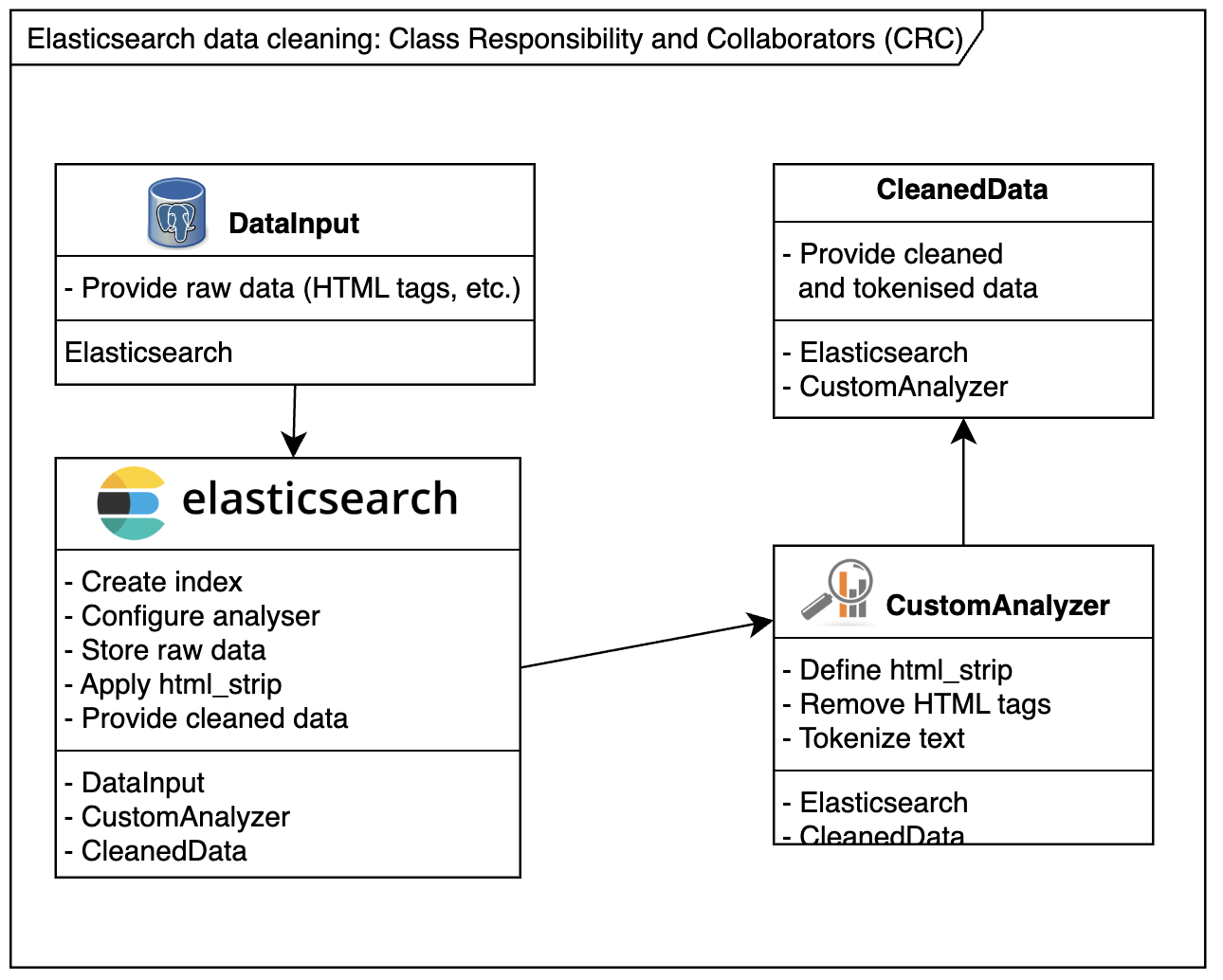
When dealing with Elasticsearch, sometimes you can’t control the format of incoming data. For instance, HTML tags may slip into your Elasticsearch index, creating unintended or unpredictable search results.
Example Scenario:
Consider the following HTML snippet indexed into Elasticsearch:
<a href="http://somedomain.com">website</a>A search for somedomain might match the above link 🫣, but users rarely expect that. To avoid such issues, use a custom analyser to clean the data before indexing. This guide shows you how to clean and debug Elasticsearch data effectively.
Step 1: Create a New Index with HTML Strip Mapping
Create a new index with a custom analyzer that uses the html_strip character filter to clean your data.
PUT Request:
PUT /html_poc_v3
{
  "settings": {
    "analysis": {
      "analyzer": {
        "my_html_analyzer": {
          "type": "custom",
          "tokenizer": "standard",
          "char_filter": ["html_strip"]
        }
      }
    }
  },
  "mappings": {
    "html_poc_type": {
      "properties": {
        "body": {
          "type": "string",
          "analyzer": "my_html_analyzer"
        },
        "description": {
          "type": "string",
          "analyzer": "standard"
        },
        "title": {
          "type": "string",
          "analyzer": "my_html_analyzer"
        },
        "urlTitle": {
          "type": "string"
        }
      }
    }
  }
}
Step 2: Post Sample Data
Add some sample data to the newly created index to test the analyzer.
POST Request:
POST /html_poc_v3/html_poc_type/02
{
  "description": "Description <p>Some déjà vu <a href=\"http://somedomain.com\">website</a>",
  "title": "Title <p>Some déjà vu <a href=\"http://somedomain.com\">website</a>",
  "body": "Body <p>Some déjà vu <a href=\"http://somedomain.com\">website</a>"
}
Step 3: Retrieve Indexed Data
To inspect the cleaned data, use the _search API with custom script fields to bypass the _source field and retrieve the actual indexed tokens.
GET Request:
GET /html_poc_v3/html_poc_type/_search?pretty=true
{
  "query": {
    "match_all": {}
  },
  "script_fields": {
    "title": {
      "script": "doc[field].values",
      "params": {
        "field": "title"
      }
    },
    "description": {
      "script": "doc[field].values",
      "params": {
        "field": "description"
      }
    },
    "body": {
      "script": "doc[field].values",
      "params": {
        "field": "body"
      }
    }
  }
}
Example Response
Here’s an example response showing the cleaned tokens for title, description, and body fields:
{
  "took": 2,
  "timed_out": false,
  "_shards": {
    "total": 5,
    "successful": 5,
    "failed": 0
  },
  "hits": {
    "total": 1,
    "max_score": 1,
    "hits": [
      {
        "_index": "html_poc_v3",
        "_type": "html_poc_type",
        "_id": "02",
        "_score": 1,
        "fields": {
          "title": [
            "Some",
            "Title",
            "déjà",
            "vu",
            "website"
          ],
          "body": [
            "Body",
            "Some",
            "déjà",
            "vu",
            "website"
          ],
          "description": [
            "a",
            "agrave",
            "d",
            "description",
            "eacute",
            "href",
            "http",
            "j",
            "p",
            "some",
            "somedomain.com",
            "vu",
            "website"
          ]
        }
      }
    ]
  }
}
Further Cleaning Elasticsearch Data References
For additional resources, explore the following links:
- Elasticsearch-Inquisitor (Test your analyzer)
- Elasticsearch: Tidying Up Input Text
- StackOverflow: Strip HTML Tags Before Indexing
- How to Modify _Source Field
- Elasticsearch Transform
- HTML Strip Char Filter
Conclusion
Cleaning Elasticsearch data using custom analyzers and filters like html_strip ensures accurate and predictable indexing. By following the steps in this guide, you can avoid unwanted behavior and maintain clean, searchable data. Use the provided resources to further enhance your Elasticsearch workflow.