Note: Check out my latest blog for updated information and solutions on this issue: Log4j 2.16.0 Fixes Critical Vulnerabilities: What You Need to Know
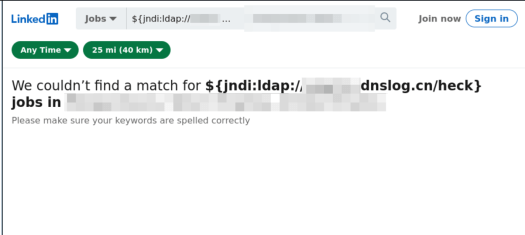
The best evidence I have seen so far is that of a little bobby table LinkedIn exploit 🫣
Overview: What Is the Log4J Zero-Day Exploit (CVE-2021-44228)?
A critical zero-day exploit affecting the widely used Log4J library has been identified and fixed in version 2.15.0. This vulnerability (CVE-2021-44228) allows attackers to gain complete control of your server remotely—making it one of the most dangerous Java-based vulnerabilities to date.
For details, visit the Apache Log4j Security Page. This isn’t just a Java developer’s headache—it’s a wake-up call for every engineer, security specialist, and even non-Java tech teams whose tools rely on Log4J indirectly (looking at you, Elasticsearch and Atlassian users).
This post explains:
- How the exploit works.
- How to check if you’re affected.
- Step-by-step fixes to secure your applications.
Quick Summary
- Upgrade Log4J to version 2.15.0 or later immediately.
- Workarounds exist for systems where upgrading isn’t feasible (see below).
- Popular apps like Elasticsearch, Minecraft, and Jira are affected.
Understanding the Exploit
The vulnerability lies in log4j-core versions 2.0-beta9 to 2.14.1. When an application logs user inputs using Log4J, the exploit allows malicious actors to execute arbitrary code remotely. In practical terms, if your app takes user input and logs it, you’re at risk.
Am I Affected?
If your system runs Java and incorporates log4j-core, either directly or through dependencies, assume you’re affected. Use tools like Maven or Gradle to identify the versions in your project. Here’s how:
For Gradle
./gradlew dependencies | grep "log4j"For Maven
./mvn dependency:tree | grep log4jMost Java applications log user inputs, making this a near-universal issue. Be proactive and investigate now.
How to Fix the Log4J Vulnerability
1. Upgrade Your Log4J Version
The most reliable solution is upgrading to Log4J 2.15.0 or newer. Here’s how for common tools:
Maven
<properties>  <log4j2.version>2.15.0</log4j2.version>
</properties>
Then verify the fix with
./mvn dependency:list | grep log4jGradle
implementation(platform("org.apache.logging.log4j:log4j-bom:2.15.0"))Then confirm the version fix with
./gradlew dependencyInsight --dependency log4j-core2. Workarounds If Upgrading Isn’t Feasible
For systems running Log4J 2.10 or later, use these temporary fixes:
Add the system property
Dlog4j2.formatMsgNoLookups=trueSet the environment variable
LOG4J_FORMAT_MSG_NO_LOOKUPS=trueFor JVM-based apps, modify the launch command
java -Dlog4j2.formatMsgNoLookups=true -jar myapplication.jarApplications Known to Be Affected
Even if you’re not directly using Log4J, many popular tools and libraries depend on it. Here’s a (non-exhaustive) list of systems at risk:
- Libraries: Spring Boot, Struts
- Applications: Elasticsearch, Kafka, Solr, Jira, Confluence, Logstash, Minecraft
- Servers: Steam, Apple iCloud
If you’re using any of these, check their documentation for specific patches or updates.
Final Reminder: Why This Matters
Apache has rated this vulnerability as critical. Exploiting it allows remote attackers to execute arbitrary code as the server user, potentially with root access. Worm-like attacks that propagate automatically are possible.
To stay secure:
- Upgrade or apply workarounds immediately.
- Regularly monitor the Apache Log4j Security Page for updates.