Category: Software Architecture

Protecting businesses through strategic thinking and technical roadmaps! Unpack the blueprints of scalable, maintainable, and boring systems aligned with the business and customers’ needs. From microservices to distributed systems and everything in between, explore what is forgotten in designing robust software solutions

  • TypeScript is Great, But Sometimes You Just Want Java

    TypeScript is Great, But Sometimes You Just Want Java

    TypeScript has become the de facto language for Angular development, and for good reason—it’s easy to learn, strongly typed, and less error-prone than JavaScript. But what if you prefer Java for its mature tooling, strong object-oriented features, and familiarity? Enter Angular2Boot—a framework built on Angular 2, GWT, and Spring Boot that lets you write Angular 2 apps in Java 8.

    This guide walks you through setting up and running an Angular 2 app in Java 8 using Angular2Boot.

    Why Angular2Boot?

    Angular2Boot bridges the gap between modern frontend development and Java’s robust backend ecosystem. It’s particularly useful for smaller applications where splitting the app into multiple tiers (WebClient, Service, Backend REST API) might feel like overkill.

    Key Benefits

    1. Stronger Typing: Java provides even stronger type-checking compared to TypeScript.
    2. Mature Tooling: Java offers tried-and-tested tools and IDEs for streamlined development.
    3. Simplified Deployment: Package everything into one Spring Boot jar for production-ready builds.
    4. Robustness: Java remains a go-to language for building scalable, enterprise-grade applications.

    Getting Started with Angular2Boot

    Step 1: Create the Project

    Generate an Angular and GWT app using Maven archetype:

    mvn archetype:generate 
      -DarchetypeGroupId=fr.lteconsulting 
      -DarchetypeArtifactId=angular2-gwt.archetype 
      -DarchetypeVersion=1.6 

    During the setup process, provide the following details:

    • Group ID: com.mosesmansaray.play
    • Artifact ID: angular-gwt-in-java8-example
    • Version: 1.0-SNAPSHOT
    • Package Name: com.mosesmansaray.play

    This will create a project scaffold with all the necessary dependencies and configurations.

    Step 2: Install Dependencies

    Build the project to install all required dependencies and produce an executable JAR file:

    mvn clean install

    The resulting JAR file will be located in your target folder:

    /angular-gwt-in-java8-example/target/angular-gwt-in-java8-example-1.0-SNAPSHOT.jar
    

    Step 3: Run the Application

    Run the fat JAR file to start your application:

    java -jar target/angular-gwt-in-java8-example-1.0-SNAPSHOT.jar
    

    Step 4: Development with Live Reload

    During development, you can enable live reload for both backend and frontend:

    Backend:

    mvn spring-boot:run

    Frontend:

    mvn gwt:run-codeserver

    This ensures a seamless development workflow with real-time updates.


    Resources for Further Exploration

    1. Library Source Code: Explore the codebase.
    2. GWT con 2016 Talk: Watch here
    3. Speaker Deck Slides: A great overview of Angular2Boot.
    4. Code Demos:

    Conclusion

    Angular2Boot allows developers to harness the power of Angular 2 while benefiting from Java’s strong typing, mature tooling, and simplified deployment. Brilliant for when you’re prototyping or building enterprise-grade systems, Angular2Boot bridges the gap between modern frontend frameworks and Java’s backend ecosystem.

    Try it and experience the best of both worlds! Let me know what you think.

  • Elasticsearch Ransomware: A Wake-Up Call for Admins

    Elasticsearch Ransomware: A Wake-Up Call for Admins

    By now, we’ve all seen this coming. With MongoDB falling victim to ransomware attacks, other NoSQL technologies like Elasticsearch were bound to follow. The alarming truth? Many Elasticsearch clusters are still open to the internet, vulnerable to attackers exploiting weak security practices, default configurations, and exposed ports.

    This guide covers essential steps to protect your Elasticsearch cluster from becoming the next target.

    TL;DR: Essential Security Measures

    1. Use X-Pack Security: If possible, implement Elastic’s built-in security features.
    2. Do Not Expose Your Cluster to the Internet: Keep your cluster isolated from public access.
    3. Avoid Default Configurations: Change default ports and settings to reduce predictability.
    4. Disable HTTP Access: If not required, disable HTTP access to limit attack vectors.
    5. Use a Firewall or Reverse Proxy: Implement security layers like Nginx, VPN, or firewalls (example Nginx config).
    6. Disable Scripts: Turn off scripting unless absolutely necessary.
    7. Regular Backups: Use tools like Curator to back up your data regularly.

    The Ransomware Playbook

    Ransomware attackers are targeting Elasticsearch clusters, wiping out data, and leaving ransom notes like this:

    “Send 0.2 BTC (bitcoin) to this wallet xxxxxxxxxxxxxx234235xxxxxx343xxxx if you want to recover your database! Send your service IP to this email after payment: xxxxxxx@xxxxxxx.org.”

    Their method is straightforward:

    • Target: Internet-facing clusters with poor configurations.
    • Exploit: Clusters with no authentication, default ports, and exposed HTTP.
    • Action: Wipe the cluster clean and demand payment.

    Why Are Clusters Vulnerable?

    Many Elasticsearch admins overlook basic security practices, leaving clusters open to the internet without authentication or firewall protection. Even clusters with security measures are often left with weak passwords, exposed ports, and unnecessary HTTP enabled.

    The lesson? Default settings are dangerous. Attackers are actively scanning for such vulnerabilities.

    How to Protect Your Elasticsearch Cluster

    1. Use Elastic’s X-Pack Security

    X-Pack, Elastic’s security plugin, provides out-of-the-box protection with features like:

    • User authentication and role-based access control (RBAC).
    • Encrypted communication.
    • Audit logging.

    If you’re using Elastic Cloud, these protections are enabled by default.

    2. Avoid Exposing Your Cluster to the Internet

    Isolate your cluster from public access:

    • Use private IPs or a Virtual Private Network (VPN).
    • Block all inbound traffic except trusted sources.

    3. Change Default Ports and Configurations

    Avoid predictability by changing Elasticsearch’s default port (9200) and disabling unnecessary features like HTTP if they aren’t required.

    4. Implement Firewalls and Reverse Proxies

    Add security layers between your cluster and potential attackers:

    • Use a reverse proxy like Nginx or Apache.
    • Configure firewall rules to allow only trusted IPs.

    5. Disable Scripting

    Unless absolutely necessary, disable Elasticsearch’s scripting capabilities to minimize attack surfaces. You can disable scripts in the elasticsearch.yml configuration file:

    script.allowed_types: none

    6. Regular Backups with Curator

    Data loss is inevitable without backups. Use tools like Elasticsearch Curator to regularly back up your data. Store snapshots in a secure, offsite location.

    Additional Resources

    Closing Thoughts

    Elasticsearch ransomware attacks are a stark reminder of the importance of proactive security measures. Whether you’re hosting your cluster on Elastic Cloud or self-managing it, adopting the security best practices outlined here will safeguard your data from malicious actors.

    Remember:

    • Change default configurations.
    • Isolate your cluster from the internet.
    • Regularly back up your data.

    If your Elasticsearch cluster is unprotected, the time to act is now—don’t wait until it’s too late.

  • Lean Maven Release: The Maven Release Plugin on Steroids

    Lean Maven Release: The Maven Release Plugin on Steroids

    If you’ve ever been frustrated by the inefficiencies of the Maven Release Plugin—multiple builds, unnecessary commits, and endless waiting—you’re not alone. Enter the Lean Maven Release, a streamlined alternative to automate and optimize your Maven release process.

    This method eliminates repetitive steps, reduces build times, and minimizes interactions with SCM (Source Control Management). Let’s break it down.


    Why Choose Lean Maven Release?

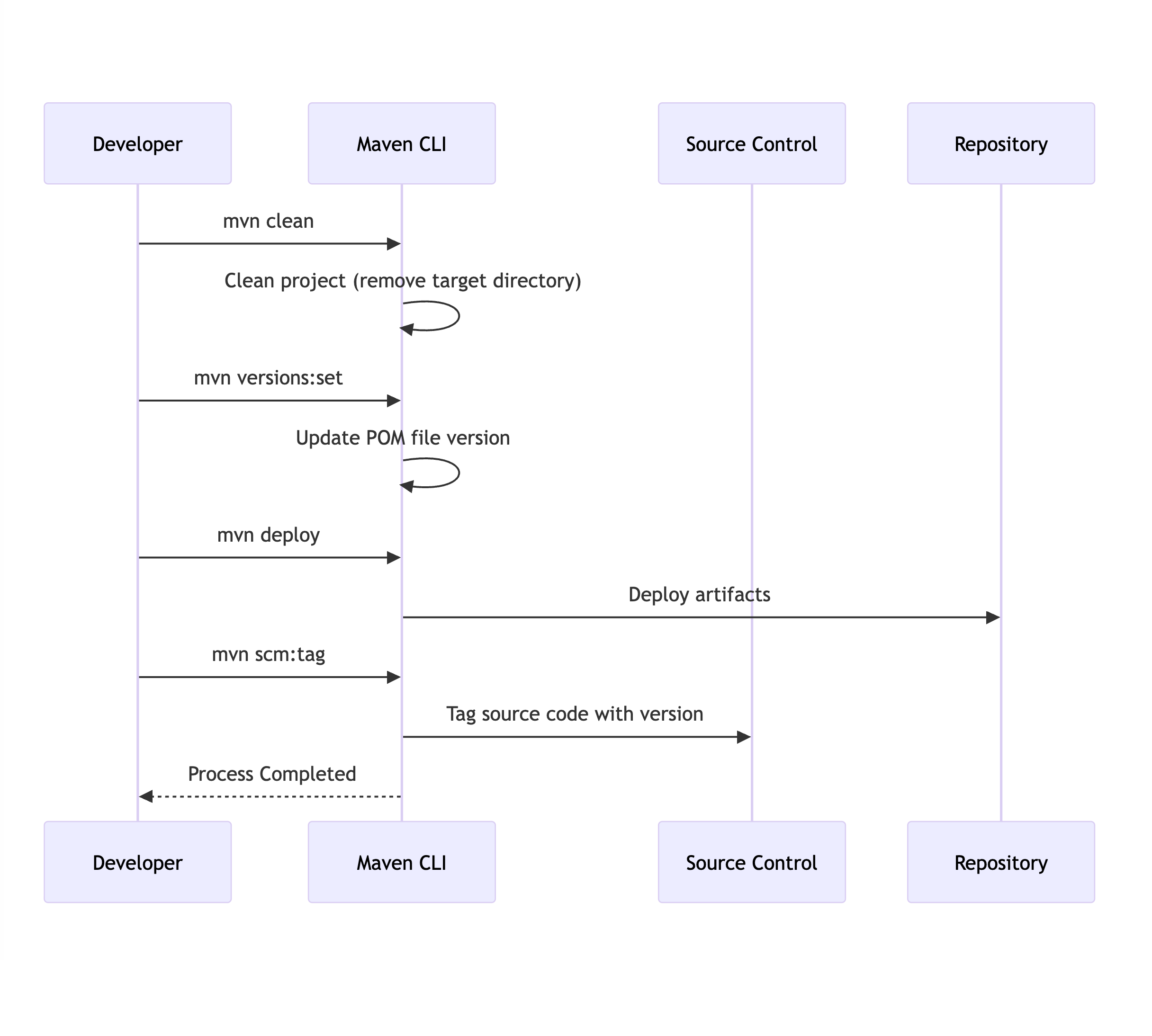
    The Lean Maven Release strategy replaces the repetitive steps of the Maven Release Plugin with a more efficient, scriptable process. Instead of multiple check-ins to SCM and redundant builds, you can reduce the process to just four commands:

    mvn clean
    mvn versions:set
    mvn deploy
    mvn scm:tag 

    This approach can be set up in both Jenkins and TeamCity, saving hours for teams practicing Continuous Delivery or working in environments with frequent build requirements.

    Benefits of Lean Maven Release

    How much of an improvement can you expect? Let’s compare the two approaches:

    StepLean Maven ReleaseMaven Release Plugin
    Clean/Compile/Test Cycle13
    POM Transformations02
    SCM Commits02
    SCM Revisions1 (binary tag)3

    The difference is clear: Lean Maven Release significantly reduces overhead and complexity.


    Getting Started

    Here’s how to implement the Lean Maven Release process in your project:


    1. Add Required Maven Properties

    Ensure the necessary Maven plugin versions are defined in your pom.xml:

    <properties>
        <maven.compiler.plugin.version>3.1</maven.compiler.plugin.version>
        <maven.release.plugin.version>2.5</maven.release.plugin.version>
        <maven.source.plugin.version>2.2.1</maven.source.plugin.version>
        <maven.javadoc.plugin.version>2.9.1</maven.javadoc.plugin.version>
        <maven.gpg.plugin.version>1.5</maven.gpg.plugin.version>
    </properties> 

    2. Configure Deployment Paths

    Set up local or remote deployment paths in the <distributionManagement> section of your pom.xml:

    Local Deployment Example:

    <distributionManagement>
        <repository>
            <id>internal.repo</id>
            <name>Internal Repo</name>
            <url>file:///${user.home}/.m2/repository/internal.local</url>
        </repository>
    </distributionManagement> 
    <distributionManagement>
        <repository>
            <uniqueVersion>false</uniqueVersion>
            <id>corp1</id>
            <name>Corporate Repository</name>
            <url>scp://repo/maven2</url>
            <layout>default</layout>
        </repository>
    </distributionManagement> 

    3. Add Maven Plugins

    Add the necessary Maven plugins to your pom.xml:

    <build>
        <pluginManagement>
            <plugins>
                <plugin>
                    <groupId>org.apache.maven.plugins</groupId>
                    <artifactId>maven-compiler-plugin</artifactId>
                    <version>${maven.compiler.plugin.version}</version>
                </plugin>
                <plugin>
                    <groupId>org.apache.maven.plugins</groupId>
                    <artifactId>maven-release-plugin</artifactId>
                    <version>${maven.release.plugin.version}</version>
                    <configuration>
                        <useReleaseProfile>false</useReleaseProfile>
                        <releaseProfiles>release</releaseProfiles>
                        <goals>deploy</goals>
                    </configuration>
                </plugin>
                <plugin>
                    <groupId>org.apache.maven.plugins</groupId>
                    <artifactId>maven-source-plugin</artifactId>
                    <version>${maven.source.plugin.version}</version>
                </plugin>
                <plugin>
                    <groupId>org.apache.maven.plugins</groupId>
                    <artifactId>maven-javadoc-plugin</artifactId>
                    <version>${maven.javadoc.plugin.version}</version>
                </plugin>
                <plugin>
                    <groupId>org.apache.maven.plugins</groupId>
                    <artifactId>maven-gpg-plugin</artifactId>
                    <version>${maven.gpg.plugin.version}</version>
                </plugin>
            </plugins>
        </pluginManagement>
    </build> 

    4. Define the Release Profile

    Include a release profile to configure the Maven deployment process:

    <profiles>
        <profile>
            <id>release</id>
            <properties>
                <activatedProperties>release</activatedProperties>
            </properties>
            <build>
                <plugins>
                    <plugin>
                        <groupId>org.apache.maven.plugins</groupId>
                        <artifactId>maven-source-plugin</artifactId>
                        <executions>
                            <execution>
                                <id>attach-sources</id>
                                <goals>
                                    <goal>jar</goal>
                                </goals>
                            </execution>
                        </executions>
                    </plugin>
                    <plugin>
                        <groupId>org.apache.maven.plugins</groupId>
                        <artifactId>maven-javadoc-plugin</artifactId>
                        <executions>
                            <execution>
                                <id>attach-javadocs</id>
                                <goals>
                                    <goal>jar</goal>
                                </goals>
                            </execution>
                        </executions>
                    </plugin>
                </plugins>
            </build>
        </profile>
    </profiles> 

    5. Optional: Configure Assembly Plugin

    If required, add an assembly descriptor for packaging:

    <assembly>
        <id>plugin</id>
        <formats>
            <format>zip</format>
        </formats>
        <includeBaseDirectory>false</includeBaseDirectory>
        <dependencySets>
            <dependencySet>
                <outputDirectory>/</outputDirectory>
                <useProjectArtifact>true</useProjectArtifact>
                <useTransitiveFiltering>true</useTransitiveFiltering>
            </dependencySet>
        </dependencySets>
    </assembly> 

    6. Skip GPG Signing (Optional)

    If you don’t want to sign packages, you can skip the GPG plugin during deployment:

    mvn deploy -Prelease -Dgpg.skip=true 

    Conclusion

    This Lean Maven Release approach allows you to:

    • Eliminate unnecessary SCM interactions.
    • Reduce build times significantly.
    • Simplify deployment workflows.

    This method is ideal for teams practicing Continuous Delivery(CD) or dealing with frequent release cycles. For more details, check out Axel Fontaine’s blog post, which inspired this guide.

    Let me know what you think!